A visual layer for coding agents
Fix UI visually.Let AI write the code.
Stop explaining pixel-level changes in prompts. Select anything in your running app, adjust spacing, colors, radius and states, then hand the exact visual intent to your coding agent.
 Search for projects, units, tenants, etc
 K
K
Hi Felix, welcome back!
Here's what's happening with your organization

$125,000
Collected this month
 +12% vs last month
Rent
$100,000
Service charge & dues
$25,000

$16,546
Outstanding payments


$352,834
Due in 30 days

 PortfolioView all units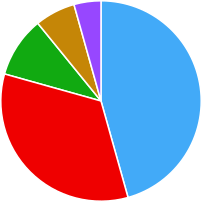
 33 Rented
 21 For Rent
 16 Sold
 10 For sale
 7 Available
 Across 2 projects, 5 buildings & 87 total units
 Monthly earnings125,000
 12%
12%



$ 125,000
Rent: $100,000
Dues: $25,000
20 April, 2025
 Needs your attention
Tenant booking form awaiting review

Ownership verification pending

Lease renewal in 12 days

Sale agreement awaiting signature
 Recent activities
Deposit payment for Flat 118 B, Appolonia

Booking form initiated for Flat 112, Bay Complex
Booking form initiated for Flat 202, Bay Complex
Rent payment for Flat 324 A, Appolonia

Payment plan for Flat 500 C, Bay Complex, is completed!
Visual feedback shouldn't be a translation exercise.
The usual way
- Spot the issue
- Take a screenshot
- Annotate it
- Write an explanation
- Send it to an engineer
- They interpret it
- The change ships
- You check again
With Limno
- 01Select
- 02Adjust
- 03Review
- 04Implement
How it works
Just make the change.
Instead of describing what needs to change, change the implemented UI directly.
Select
Hover over anything in your running app. Limno names the element and, where it can, the component and the line of code behind it.
Needs your attentionTenant booking form awaiting review
Ownership verification pending
Lease renewal in 12 days
Sale agreement awaiting signature
Adjust
Use the controls you already know from design tools. You don't need to know how the change should be built. Just make it look right.
$16,546
Outstanding payments
Review
Every adjustment lands in a change set. Nothing touches your code until you've looked it over and decided what goes.
Implement
Your coding agent receives the exact elements, components, states, tokens and scope, plus before and after screenshots.
RevenueCard  src/components/RevenueCard.tsx:12
  radius   radius-2xl → radius-xl
  gap      space-12 → space-8
  scope    this component

Button  “View all units” · hover
  fill     bg/primary → bg/tertiary
  scope    all 6 buttons

+ before/after screenshots, page, viewport
Design-system aware
Use the tokens you already have.
Limno reads your design tokens, so a change is recorded as var(--radius-xl) rather than another one-off value. Your coding agent then builds it with your own components and conventions.
Try it: pick a radius.
$352,834
Due in 30 days
border-radius: 24px;border-radius: var(--radius-xl);Component states
Fix the state, not just the screenshot.
Switch any element to hover, focus, pressed or disabled and correct it right there, instead of explaining state-specific behaviour through screenshots.
Try it: switch states.
Multiple selection
Pixel pushing, without the pixel pushing.
Select several elements and align or distribute them. Limno records the relationship you want, “align these three to the top”, not just a CSS property.
Try it: use the align tools.
Before and after
What you move on screen is what your agent changes in code.
$125,000
Collected this month
+12% vs last monthRent
$100,000
Service charge & dues
$25,000
$16,546
Outstanding payments
$352,834
Due in 30 days
- RevenueCard and StatCard identifiedsrc/components/
- Existing tokens resolvedradius-xl · space-6 · tints
- Component scope confirmed3 cards, 6 changes
- Changes implemented3 files edited
- Checked on the page by Limno6 of 6 verified
Review before you ship
Every visual change becomes a change set.
Limno never turns a click into an irreversible code change. Changes collect in one place, where you can switch any of them off, preview the result and compare before and after. You approve the set; your agent does the rest.
Works wherever you review
Review anywhere. Implement where the code lives.
Where you find the problem doesn't have to be where you fix it.
Localhost
Edit & implement
Working against your dev server. Limno hands the change set straight to your coding agent, then checks the result on the page.
Staging
Edit & propose
Review a deployed build with the Chrome extension, make the changes, then copy them for your agent or export a fix request.
Production
Inspect & propose
The live site stays untouched. Try the fix on the real page, then send it to whoever owns the code.
Your coding agent
Limno isn't another coding agent.
It gives the one you already use something it doesn't naturally have: precise visual intent.
Share with engineering
No repo access? Send the fix.
Export a fix request an engineer can open and build from directly.
- RevenueCard Radius 32px → 24px
- RevenueCard Gap 48px → 32px
- View all units · hover Fill bg/primary → bg/tertiary
Try Limno
Two minutes to your first change.
Run one command in your app's folder. Limno only runs in development and never ships in your production build.
npx @limno/cli init- Detects your framework and package manager
- Shows the config changes, then applies them
- Runs Claude Code or Codex for you on Send
Then start your dev server and press ⌥E on Mac or Alt+E on Windows.
Or set it up by hand
npm i -D @limno/nextimport { withLimno } from "@limno/next";
export default withLimno({
// your Next.js config
});import { Limno } from "@limno/next/client";
// inside <body>, after {children}
<Limno />Chrome extension
Review staging and production sites, no install in the codebase. Coming soon to the Chrome Web Store.
Stop describing pixels.Start moving them.
Limno turns visual feedback into implementation-ready changes, wherever you review your product.
Nothing leaves your machine. Read the privacy policy